openEHR Explorer

Brand Kit

Use these assets consistently when representing openEHR Explorer in Discourse posts, presentations, integrations, or community content.

Logo

Dark variantopenEHR Explorer
Light variantopenEHR Explorer
Use the SVGs below wherever possible — they stay crisp at any size and carry the wordmark in Inter SemiBold, colour #64ffda on dark backgrounds (or #0f3460 on light backgrounds). The PNG is provided for tools that don't accept vector formats.
AssetFormatStatus
Logo — dark backgroundSVG✓ Available
Logo — light backgroundSVG✓ Available
Logo icon onlySVG✓ Available
Logo — dark backgroundPNG (@2x resolution)✓ Available
Colour palette referenceSVG✓ Available

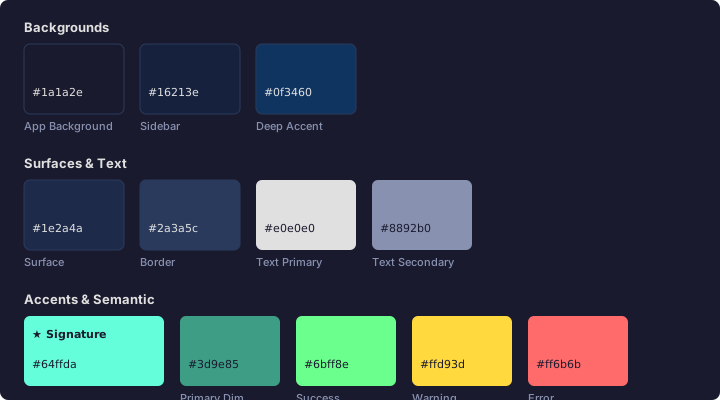
Colour Palette

Backgrounds

#1a1a2e
App Background
#16213e
Sidebar / Secondary
#0f3460
Deep Accent

Surfaces & Text

#1e2a4a
Surface
#2a3a5c
Border
#e0e0e0
Text Primary
#8892b0
Text Secondary

Accents & Semantic

#64ffda
Primary Teal★ Signature Colour
#3d9e85
Primary Dim
#6bff8e
Success
#ffd93d
Warning
#ff6b6b
Error

Typography

Inter

openEHR Explorer
Browse, query, and inspect

All UI text, headings, body copy, wordmark

JetBrains Mono

GET /rest/openehr/v1/ehr
vital-signs/blood_pressure:0/any_event:0/systolic|magnitude

All code blocks, FLAT paths, AQL queries, UUIDs

Usage Guidelines

✓ Do

  • Use #64ffda teal as the primary accent on dark (#1a1a2e+) backgrounds
  • Use Inter SemiBold for the wordmark at 14px minimum
  • Pair the logo with adequate clear space (minimum half the logo height on all sides)
  • Use JetBrains Mono for all code and path examples

✗ Don't

  • Use oehrpy's blue #3b82f6 or orange #f97316 — those colours are oehrpy's identity
  • Place teal #64ffda on white or light backgrounds (contrast fails WCAG AA)
  • Recreate the logo from memory — download the SVG when available
  • Modify the wordmark font, weight, or letter-spacing